Blog

  • discord-haruka

    API Docs | GitHub | npm | Teardown

    Haruka

    Haruka, your useless Discord bot. Add Haruka.

    Commands

    Haruka has 25 functions:

    • -h 8ball: Answers any yes or no question.
    • -h about: General stuff about Haruka.
    • -h aesthetic: Makes your text more aesthetic.
    • -h anime: Looks up information for an anime, you weeb.
    • -h emote: Manages server emotes
    • -h github: Retrieve information about a GitHub repository.
    • -h health: Tips to improve your bodily health.
    • -h help: Returns a list of all the commands, much like this one.
    • -h invite: Replies with a URL to invite Haruka to other servers.
    • -h kanji: Retrieve information about a Kanji character.
    • -h kick: Kicks all of the mentioned users.
    • -h manga: Looks up information for a manga, you weeb.
    • -h now: Returns the current time in UTC
    • -h pfp: Return a user’s profile image as a URL.
    • -h ping: Replies “Pong!”
    • -h pkmn: Gets information about a Pokémon.
    • -h purge: Deletes messages in bulk.
    • -h restart: Restarts Haruka.
    • -h reverse: Reverses some text.
    • -h say: Replies with whatever you tell it to.
    • -h smash: Looks up information on any Smash Ultimate fighter.
    • -h someone: Mentions a user chosen at random.
    • -h version: Prints out technical information about Haruka.
    • -h wa: Compute anything with WolframAlpha.
    • -h xkcd: Fetches xkcd comics.

    Installation

    Although Haruka can be installed via npm i discord-haruka, it’s not recommended, as Haruka isn’t a module. Instead, go to the GitHub repo and get a copy of Haruka’s latest release. In the root directory, open the file called .env.ex, and place your keys in there.

    DISCORD_TOKEN=
    KANJI_ALIVE_KEY=
    WA_APPID=
    HARUKA_OPS=

    Place your super sensitive keys in here. Be mindful as to not add spaces around the equal sign. DISCORD_TOKEN is your bot’s login token which can be found in the Discord Developer portal. The second key, KANJI_ALIVE_KEY, is your X-Mashape-Key used for KanjiAlive, the API used to retrieve Kanji data. If you don’t wish to use the Kanji function, rename src/functions/kanji.coffee to src/functions/_kanji.coffee and rerun the build command. In a similar fashion, the WA_APPID key is Haruka’s WolframAlpha AppID, which can be found here. You can disable this function similarly to disabling the Kanji function.

    The HARUKA_OPS key is a comma-separated list of IDs of users who can run the -h halt command. Add your User ID to the list. If adding multiple people, please separate them with commas WITHOUT any surrounding spaces. The HARUKA_LOG_GUILD_ID and HARUKA_LOG_CHANNEL_ID are for collecting function usage statistics. Haruka will send basic information about the command called in this guild and channel. If you do not wish to gather usage statistics, you may omit these fields.

    Finally, rename .env.ex to simply .env. Run npm install to install Haruka’s dependencies, and run her locally by using npm start.

    Contributing

    First of all, get to know how Haruka works. Haruka is made of several component parts, and understanding how they work will ease development. Install Haruka as mentioned above, create a fork with your changes, and issue a Pull Request. Haruka’s written in CoffeeScript, you can build her by running npm build or npm watch in the root directory with CoffeeScript installed (devDependency). It’s also recommended you have a CoffeeScript linter installed.

    License

    MIT License

    Visit original content creator repository

  • laravel-newsletter

    Laravel Newsletter

    StyleCI Scrutinizer Code Quality Code Intelligence Status Code Intelligence Status

    Laravel Newsletter is an open source project that can be used for sending newsletters to multiple subscribers, mailing lists, … at once. This project can be used together with free mailing applications such as MailGun.

    Installation

    Step 1

    First of all you need to clone the repository and install it using composer.

    git clone git@github.com:NathanGeerinck/laravel-newsletter.git
    cd laravel-newsletter && composer install
    php artisan laravel-newsletter:install
    npm run production

    Step 2

    Then you need to create a database and fill out the credentials in the .env file. An example:

    DB_CONNECTION=mysql
    DB_HOST=127.0.0.1
    DB_PORT=3306
    DB_DATABASE=laravel-newsletter
    DB_USERNAME=root
    DB_PASSWORD=root
    

    Once you’ve created the database you can migrate all the tables into your database by running:

    php artisan migrate

    If you want to import the demo data then you can run:

    php artisan laravel-newsletter:demo

    Step 3

    For sending emails you need to fillout your mail credentials.. You can use a service like Mailgun. You can adjust these settings also in the .env file.

    MAIL_DRIVER=smtp
    MAIL_HOST=mailgun.org
    MAIL_PORT=2525
    MAIL_USERNAME=
    MAIL_PASSWORD=
    MAIL_ENCRYPTION=null
    

    Step 4

    If you want to use a Queue, it’s possible!

    Finish

    Now you’re ready to rock and roll! Visit the /register page of you’re application and create an account! 😉

    If you ran the php artisan laravel-newsletter:demo command, you can login with ‘john.doe@gmail.com‘ and ‘test123’.

    Roadmap

    • Translate the application to more languages (now available: English, Dutch)
    • Email bounce tracking
    • Creating an API
    • Importing subscriptions with use of an URL (JSON)

    License

    The laravel-newsletter application is open source software licensed under the license MIT.

    Contributors

    Donate

    If you love this project and you appreciate my work.. You might consider buying me a coffee. ☕️

    Buy Me A Coffee

    Visit original content creator repository
  • django-we

    django-we

    Django WeChat OAuth2/Share/Token API

    Installation

    pip install django-we

    Urls.py

    from django.urls import include, re_path
    
    urlpatterns = [
        re_path(r'^we/', include('django_we.urls', namespace='django_we')),
    ]

    or

    from django.urls import re_path
    from django_we import views as we_views
    
    # WeChat OAuth2
    urlpatterns = [
        re_path(r'^o$', we_views.we_oauth2, name='shorten_o'),
        re_path(r'^oauth$', we_views.we_oauth2, name='shorten_oauth'),
        re_path(r'^oauth2$', we_views.we_oauth2, name='shorten_oauth2'),
        re_path(r'^we_oauth2$', we_views.we_oauth2, name='we_oauth2'),
        re_path(r'^base_redirect$', we_views.base_redirect, name='base_redirect'),
        re_path(r'^userinfo_redirect$', we_views.userinfo_redirect, name='userinfo_redirect'),
        re_path(r'^direct_base_redirect$', we_views.direct_base_redirect, name='direct_base_redirect'),
        re_path(r'^direct_userinfo_redirect$', we_views.direct_userinfo_redirect, name='direct_userinfo_redirect'),
    ]
    
    # WeChat Share
    urlpatterns += [
        re_path(r'^ws$', we_views.we_share, name='shorten_we_share'),
        re_path(r'^weshare$', we_views.we_share, name='we_share'),
    ]
    
    # WeChat JSAPI Signature
    urlpatterns += [
        re_path(r'^js$', we_views.we_jsapi_signature_api, name='shorten_we_jsapi_signature_api'),
        re_path(r'^jsapi_signature$', we_views.we_jsapi_signature_api, name='we_jsapi_signature_api'),
    ]
    
    # WeChat Token
    urlpatterns += [
        re_path(r'^token$', we_views.we_access_token, name='we_token'),
        re_path(r'^access_token$', we_views.we_access_token, name='we_access_token'),
    ]

    Settings.py

    INSTALLED_APPS = (
        ...
        'django_we',
        ...
    )
    
    # Wechat Settings
    WECHAT = {
        'JSAPI': {
            'token': '5201314',
            'appID': '',
            'appsecret': '',
            'mchID': '',
            'apiKey': '',
            'mch_cert': '',
            'mch_key': '',
            'redpack': {
                'SEND_NAME': '',
                'NICK_NAME': '',
                'ACT_NAME': '',
                'WISHING': '',
                'REMARK': '',
            }
        },
    }
    
    # Wechat OAuth Cfg
    DJANGO_WE_OAUTH_CFG = 'JSAPI'  # Default ``JSAPI``
    
    # Based on Urls.py
    # WECHAT_OAUTH2_REDIRECT_URI = 'https://we.com/we/we_oauth2?scope={}&redirect_url={}'
    # WECHAT_OAUTH2_REDIRECT_URI = 'https://we.com/we/o?scope={}&r={}'  # Shorten URL
    WECHAT_OAUTH2_REDIRECT_URI = 'https://we.com/we/o?r={}'  # Shorten URL Farther, Scope default ``snsapi_userinfo``
    WECHAT_BASE_REDIRECT_URI = 'https://we.com/we/base_redirect'
    WECHAT_USERINFO_REDIRECT_URI = 'https://we.com/we/userinfo_redirect'
    WECHAT_DIRECT_BASE_REDIRECT_URI = 'https://we.com/we/direct_base_redirect'
    WECHAT_DIRECT_USERINFO_REDIRECT_URI = 'https://we.com/we/direct_userinfo_redirect'
    
    # Temp Share Page to Redirect
    WECHAT_OAUTH2_REDIRECT_URL = ''

    Callbacks

    Wechat_Only

    • Settings.py

      MIDDLEWARE = [
          ...
          'detect.middleware.UserAgentDetectionMiddleware',
          ...
      ]
      
      WECHAT_ONLY = True  # Default False
    • Usage

      from django_we.decorators import wechat_only
      
      @wechat_only
      def xxx(request):
          """ Docstring """

    Visit original content creator repository

  • hm_caldav

    CalDav integration for HomeMatic – hm_caldav

    Release Downloads Issues License Donate

    This CCU-Addon reads an ics file from the given url. In the configuration you can define which meeting are represented as system variables within the HomeMatic CCU environment. If a defined meeting is running this is represented by the value of the corresponding system variable. Additionally there are variables -TODAY and -TOMORROW which are set to active if a meeting is planned today or tommorow, even if the meeting only last for e.g. an hour.

    Important: This addon is based on wget. On your CCU there might be an outdated version of wget, which might not support TLS 1.1 or TLS 1.2.

    Supported CCU models

    Installation as CCU Addon

    1. Download of recent Addon-Release from Github
    2. Installation of Addon archive (hm_caldav-X.X.tar.gz) via WebUI interface of CCU device
    3. Configuration of Addon using the WebUI accessible config pages

    Manual Installation as stand-alone script (e.g. on RaspberryPi)

    1. Create a new directory for hm_caldav:

       mkdir /opt/hm_caldav
      
    2. Change to new directory:

       cd /opt/hm_caldav
      
    3. Download latest hm_caldav.sh:

       wget https://github.com/H2CK/hm_caldav/raw/master/hm_caldav.sh
      
    4. Download of sample config:

       wget https://github.com/H2CK/hm_caldav/raw/master/hm_caldav.conf.sample
      
    5. Rename sample config to active one:

       mv hm_caldav.conf.sample hm_caldav.conf
      
    6. Modify configuration according to comments in config file:

       vim hm_caldav.conf
      
    7. Execute hm_caldav manually:

       /opt/hm_caldav/hm_caldav.sh
      
    8. If you want to automatically start hm_caldav on system startup a startup script

    Using ‘system.Exec()’

    Instead of automatically calling hm_caldav on a predefined interval one can also trigger its execution using the system.Exec() command within HomeMatic scripts on the CCU following the following syntax:

        system.Exec("/usr/local/addons/hm_caldav/run.sh <iterations> <waittime> &");
    

    Please note the <iterations> and <waittime> which allows to additionally specify how many times hm_caldav should be executed with a certain amount of wait time in between. One example of such an execution can be:

        system.Exec("/usr/local/addons/hm_caldav/run.sh 5 2 &");
    

    This will execute hm_caldav for a total amount of 5 times with a waittime of 2 seconds between each execution.

    Support

    In case of problems/bugs or if you have any feature requests please feel free to open a new ticket at the Github project pages.

    License

    The use and development of this addon is based on version 3 of the LGPL open source license.

    Authors

    Copyright (c) 2018-2021 Thorsten Jagel <dev@jagel.net>

    Notice

    This Addon uses KnowHow that was developed throughout the following projects:

    Visit original content creator repository
  • Computer-Benchmark

    Computer-Benchmark

    Analyzing the performance of my custom built PC using a variety of gaming and synthetic benchmarks.

    Compiling Data

    I measured several variables as I tested my computer (such as but not limited to GPU/CPU temperature, power draw, utilization, and clock speed) to see if my PC was performing as I’d expect for the components I bought. In addition, getting a baseline performance analysis of my computer will help me in the future if something starts to act up on my computer. For example, I’ll have a good idea when my the thermal compound on my CPU cooler needs to be replaced once the CPU starts going significantly above the baseline temperature I measured while all the components were new.

    The two programs I used to measure these variables were Nvidia’s Frameview and HWiNFO64 which saved the data as CSV’s that I could then import into R.

    In the case of frameview, the program created a new CSV file for every game tested with the name of the game being included in the CSV’s file name. So, instead of manually compiling each of the separate game files together I built a python program called “Organize Excel” to automatically sort through all the CSV files in the frame view folder and combine them together as individual sheets within a single excel file for easy analysis in R.

    I compiled all the data I collected into line and bar graphs using ggplot2 in R.

    Gaming Benchmarks

    My current test suit of games includes: GTAV, Overwatch, Rainbow Six Siege, Apex Legends, Destiny 2, Rocket League, Battlefront 2, Halo Infinite, Fortnite, and Call of Duty: Warzone. For each game I examined the following variables as I ran my benchmark: Frametime, GPU and CPU temperature, GPU and CPU utilization, GPU and CPU clock speed, GPU and CPU power consumption, Fan speed for CPU & GPU coolers, fan speed for the case fans, and Average FPS, 1% low FPS, and .1% low FPS. Analysis and graphs made for the gaming test suite was this was done in the “neat_game” program.

    For all the variables above except Average FPS, 1% low FPS, and .1% low FPS each game was tested one time. For the Average FPS, 1% low FPS, and .1% low FPS I tested each game three times and then averaged the results together to get a more accurate measure of real world FPS while playing games.

    Synthetic Benchmarks

    The synthetic benchmarks I tested with are 3D Mark’s Timespy and Fire Strike Extreme, Heaven, and Cinebench R23. I tested the same variables with the synthetic benchmarks as I did with games except I did not measure frametime or any FPS measure. Analysis and graphs made for synthetic benchmarks test suite was this was done in the “neat_synthetic” program.

    Sorting Graphs by Name

    Once all the graphs from the “neat_game” and “neat_synthetic” programs were made and automatically saved into their specific “unsorted” folders, I used built a python program called “Graph File Organization” to sort each graph into relevant folders designated by the specific game/synthetic benchmark name.

    More Information

    For more information on the configuration and specifications of my computer please see the document titled “Computer info -July 1 Tests.docx”.

    “Problems are opportunities in disguise.” – Charles F. Kettering

    Visit original content creator repository

  • SMS_Gateway_Flutter

    REST API Documentation for SMS Gateway: Flutter

    This documentation outlines the API endpoints for the SMS Gateway application. It details each endpoint’s functionality, request/response structure, and example use cases.


    Overview

    Base URL

    The base URL serves as the entry point for all API requests:
    {{base_url}}
    Example: https://localhost:8080/


    Endpoints

    1. Retrieve SMS Messages

    Description

    This endpoint retrieves all SMS messages stored on the server.

    Request

    • Method: GET
    • URL: {{base_url}}/sms
    • Headers: None required

    Query Parameters

    You can optionally include query parameters to filter results:

    • phone_number (optional): Filter messages by the associated phone number.

    Example Request

    GET https://localhost:8080/sms

    Response

    • Status Code: 200 OK
    • Body: JSON array containing SMS records

    Postman Test Code

    pm.test("Status code is 200", function () {
        pm.response.to.have.status(200);
    });

    2. Send an SMS

    Description

    This endpoint allows you to send an SMS by providing a recipient’s phone number and a message in the request body.

    Request

    • Method: POST
    • URL: {{base_url}}/sms
    • Headers:
      • Content-Type: application/json
    • Body: JSON object

      {
          "number": "+1234567890",
          "message": "Hello, this is a test message!"
      }

    Example Request

    POST https://localhost:8080/sms
    Content-Type: application/json
    
    {
        "number": "+1234567890",
        "message": "Hello, this is a test message!"
    }

    Response

    • Status Code:
      • 200 OK or
      • 201 Created
    • Body: JSON confirmation of the message sent

    Postman Test Code

    pm.test("Successful POST request", function () {
        pm.expect(pm.response.code).to.be.oneOf([200, 201]);
    });

    3. Delete an SMS

    Description

    This endpoint deletes a specific SMS record by its unique identifier (id).

    Request

    • Method: DELETE
    • URL: {{base_url}}/sms/:id
      (Replace :id with the actual SMS ID)
    • Headers: None required
    • Body: Empty

    Example Request

    DELETE https://localhost:8080/sms/2

    Response

    • Status Code:
      • 200 OK
      • 202 Accepted
      • 204 No Content

    Postman Test Code

    pm.test("Successful DELETE request", function () {
        pm.expect(pm.response.code).to.be.oneOf([200, 202, 204]);
    });

    Variables

    Defined Variables

    These variables allow dynamic usage of the API:

    1. base_url

      • Value: https://localhost:8080/
      • Description: The root URL for the API.
    2. id

      • Value: 1
      • Description: Represents the identifier for specific SMS records used in GET and DELETE requests.

    Usage Guidelines

    1. Set the base_url variable to point to your API server.
    2. Use the provided endpoints to perform CRUD operations.
    3. Ensure that you have a stable internet connection for server communication.

    Additional Information

    Postman Tests

    Each endpoint includes a predefined Postman test to verify expected behavior. These tests ensure:

    • Correct status codes are returned (200, 201, etc.)
    • Proper response formats for all CRUD operations

    Prerequest Scripts

    No prerequest scripts are defined in the current configuration.


    Examples

    Example 1: Retrieve All SMS Messages

    curl -X GET "{{base_url}}/sms"

    Example 2: Send an SMS

    curl -X POST "{{base_url}}/sms" \
    -H "Content-Type: application/json" \
    -d '{
        "number": "+1234567890",
        "message": "Hello, this is a test message!"
    }'

    Example 3: Delete an SMS

    curl -X DELETE "{{base_url}}/sms/2"

    Notes

    • This application is a proof-of-concept and may require additional features for production use.
    • Ensure the server is configured correctly and accessible at the specified base URL.

    For additional questions or support, refer to the development team.

    Visit original content creator repository

  • react-native-expo-fancy-alerts

    React Native Fancy Alerts

    NPM version Downloads License

    Adaptation of nativescript-fancyalert for react native. Compatible with expo 🤓

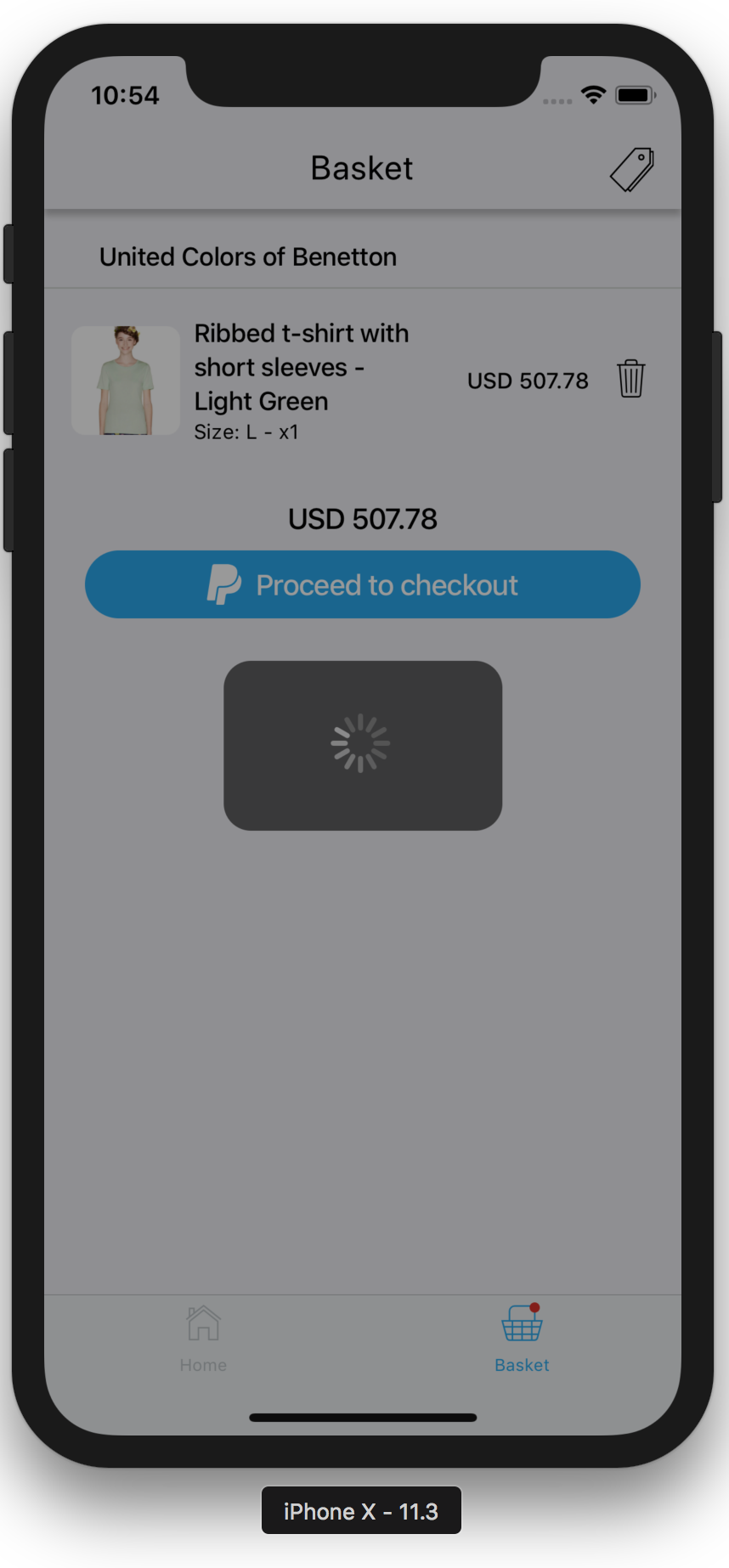
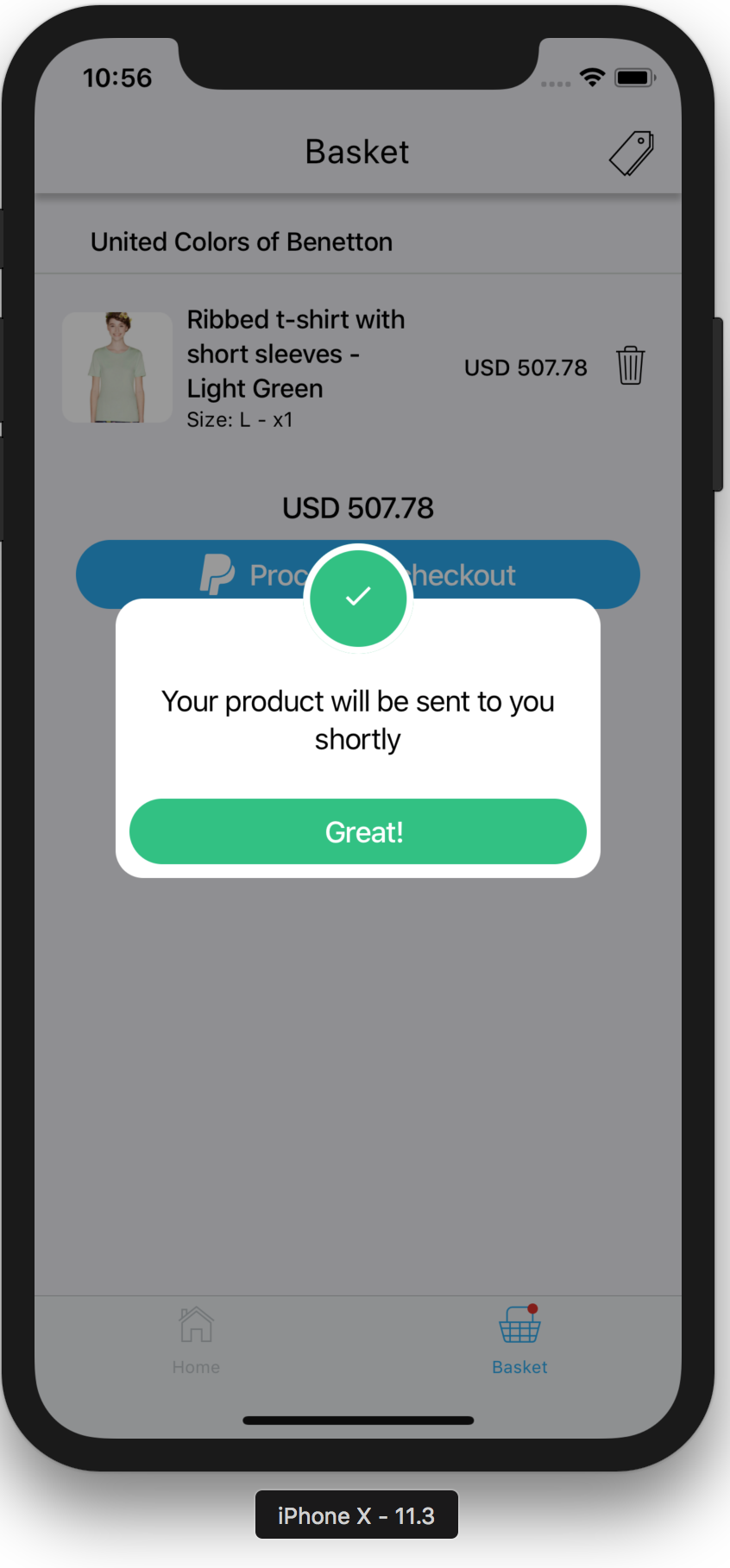
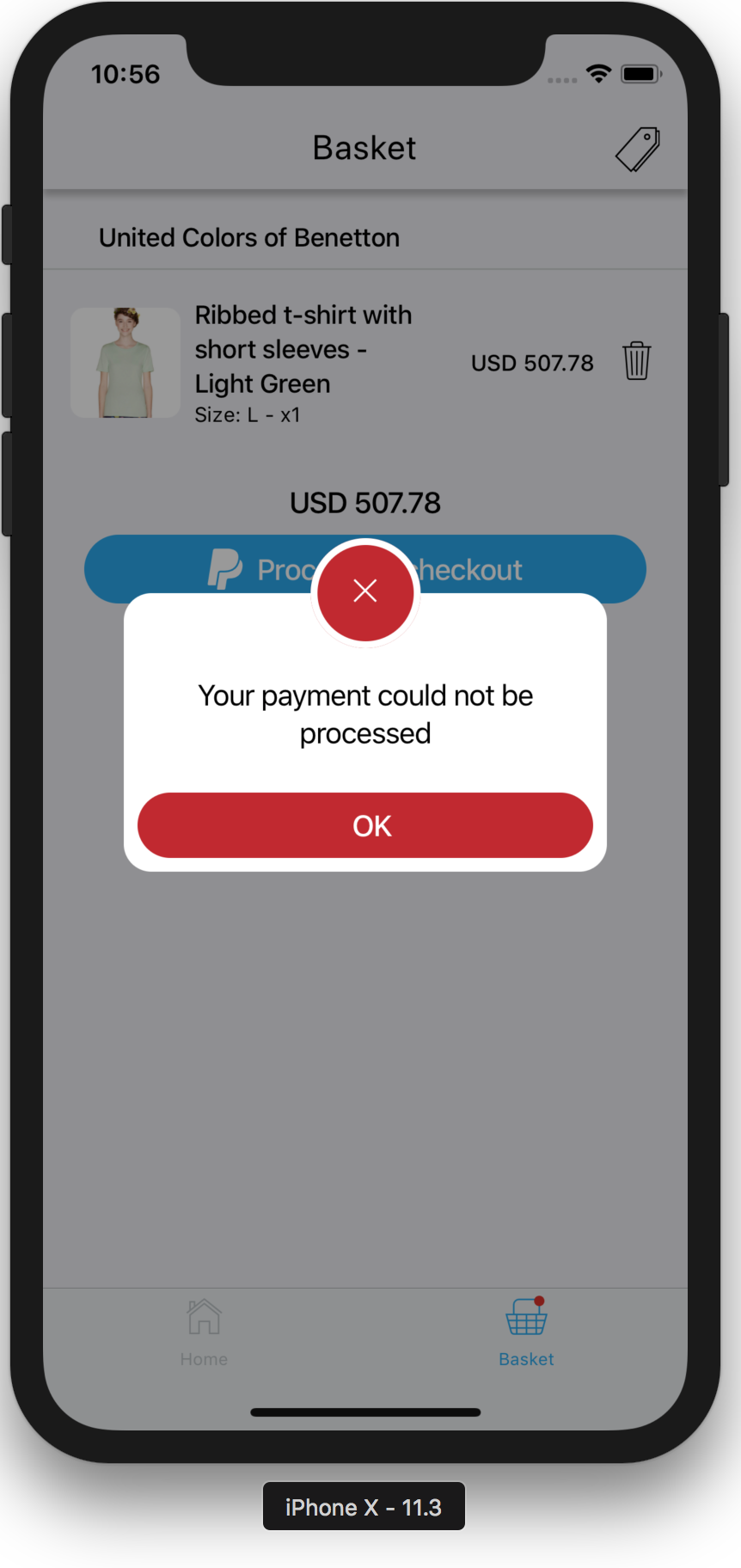
    Screenshot loading Screenshot success Screenshot error

    Quick Start

    $ npm i react-native-expo-fancy-alerts

    Or

    $ yarn add react-native-expo-fancy-alerts
    import React from 'react';
    import { Text, TouchableOpacity, View } from 'react-native';
    import { FancyAlert } from 'react-native-expo-fancy-alerts';
    
    const App = () => {
      const [visible, setVisible] = React.useState(false);
      const toggleAlert = React.useCallback(() => {
        setVisible(!visible);
      }, [visible]);
    
      return (
        <View>
          <TouchableOpacity onPress={toggleAlert}>
            <Text>Tap me</Text>
          </TouchableOpacity>
    
          <FancyAlert
            visible={visible}
            icon={<View style={{
              flex: 1,
              display: 'flex',
              justifyContent: 'center',
              alignItems: 'center',
              backgroundColor: 'red',
              borderRadius: 50,
              width: '100%',
            }}><Text>🤓</Text></View>}
            style={{ backgroundColor: 'white' }}
          >
            <Text style={{ marginTop: -16, marginBottom: 32 }}>Hello there</Text>
          </FancyAlert>
        </View>
      )
    }
    
    export default App;

    Reference

    LoadingIndicator

    Property Type Required Default Description
    visible bool yes n/a Whether the loading indicator should be shown

    FancyAlert

    Property Type Required Default Description
    visible bool yes n/a Whether the alert should be visible
    icon node yes n/a The icon to show in the alert
    style object no {} Like your usual style prop in any View
    onRequestClose func no () => void The action to run when the user taps the button
    • NOTE – Alerts are not dismissed by tapping the blurry background

    Examples

    The following example illustrates how you can create a loading indicator for your entire app. If you’re using redux you may have a part of your store which says whether you’re loading something, you can get that flag and show one of the loading indicators offered by this lib.

    import React from 'react';
    import { useSelector } from 'react-redux';
    import { LoadingIndicator } from 'react-native-expo-fancy-alerts';
    import { selectIsLoading } from 'selectors';
    
    const AppLoadingIndicator = () => {
      const isLoading = useSelector(selectIsLoading);
      return <LoadingIndicator visible={isLoading} />;
    }
    
    export default AppLoadingIndicator;

    This next one is an error message that is also managed globally through redux.

    import React from 'react';
    import { Platform, Text, View, StyleSheet } from 'react-native';
    import { useDispatch, useSelector } from 'react-redux';
    import { FancyAlert } from 'react-native-expo-fancy-alerts';
    import { Ionicons } from '@expo/vector-icons';
    import { ErrorCreators } from 'creators';
    import { selectError } from 'selectors';
    
    const AppErrorModal = () => {
      const dispatch = useDispatch();
      const { hasError, error } = useSelector(selectError);
    
      const onRequestClose = React.useCallback(
        () => {
          dispatch(ErrorCreators.hideError());
        },
        [dispatch],
      );
    
      return <FancyAlert
        style={styles.alert}
        icon={
          <View style={[ styles.icon, { borderRadius: 32 } ]}>
            <Ionicons
              name={Platform.select({ ios: 'ios-close', android: 'md-close' })}
              size={36}
              color="#FFFFFF"
            />
          </View>
        }
        onRequestClose={onRequestClose}
        visible={hasError}
      >
        <View style={styles.content}>
          <Text style={styles.contentText}>{error ? error.message : ''}</Text>
    
          <TouchableOpacity style={styles.btn} onPress={onPress}>
            <Text style={styles.btnText}>OK</Text>
          </TouchableOpacity>
        </View>
      </FancyAlert>;
    }
    
    const styles = StyleSheet.create({
      alert: {
        backgroundColor: '#EEEEEE',
      },
      icon: {
        flex: 1,
        display: 'flex',
        justifyContent: 'center',
        alignItems: 'center',
        backgroundColor: '#C3272B',
        width: '100%',
      },
      content: {
        display: 'flex',
        flexDirection: 'column',
        justifyContent: 'center',
        alignItems: 'center',
        marginTop: -16,
        marginBottom: 16,
      },
      contentText: {
        textAlign: 'center',
      },
      btn: {
        borderRadius: 32,
        display: 'flex',
        flexDirection: 'row',
        justifyContent: 'center',
        alignItems: 'center',
        paddingHorizontal: 8,
        paddingVertical: 8,
        alignSelf: 'stretch',
        backgroundColor: '#4CB748',
        marginTop: 16,
        minWidth: '50%',
        paddingHorizontal: 16,
      },
      btnText: {
        color: '#FFFFFF',
      },
    });
    
    export default AppErrorModal;

    Changelog

    • 0.0.1 – Initial implementation – has layout issues on Android that WILL be fixed
    • 0.0.2 – Android issue fixed
    • 0.0.3 – Added extra customization options
    • 1.0.0 – Years later I decided to package everything and release 🎉🥳
    • 2.0.0 – BREAKING CHANGES Updated FancyAlert to be more intuitive and more generic
    • 2.0.1 – Updated docs to include some real-life examples
    • 2.0.2 – Updated dependencies
    • 2.1.0 – Added typescript typings
    Visit original content creator repository
  • Tabular-data-generation

    CodeFactor Code style: black License Downloads

    GANs and TimeGANs, Diffusions, LLM for tabular data

    Generative Networks are well-known for their success in realistic image generation. However, they can also be applied to generate tabular data. This library introduces major improvements for generating high-fidelity tabular data by offering a diverse suite of cutting-edge models, including Generative Adversarial Networks (GANs), specialized TimeGANs for time-series data, Denoising Diffusion Probabilistic Models (DDPM), and Large Language Model (LLM) based approaches. These enhancements allow for robust data generation across various dataset complexities and distributions, giving an opportunity to try GANs, TimeGANs, Diffusions, and LLMs for tabular data generation.

    How to use library

    • Installation: pip install tabgan
    • To generate new data to train by sampling and then filtering by adversarial training call GANGenerator().generate_data_pipe.

    Data Format

    TabGAN accepts data as a numpy.ndarray or pandas.DataFrame with columns categorized as:

    • Continuous Columns: Numerical columns with any possible value.
    • Discrete Columns: Columns with a limited set of values (e.g., categorical data).

    Note: TabGAN does not differentiate between floats and integers, so all values are treated as floats. For integer requirements, round the output outside of TabGAN.

    Sampler Parameters

    All samplers (OriginalGenerator, GANGenerator, ForestDiffusionGenerator, LLMGenerator) share the following input parameters:

    • gen_x_times: float (default: 1.1) – How much data to generate. The output might be less due to postprocessing and adversarial filtering.
    • cat_cols: list (default: None) – A list of column names to be treated as categorical.
    • bot_filter_quantile: float (default: 0.001) – The bottom quantile for postprocess filtering. Values below this quantile will be filtered out.
    • top_filter_quantile: float (default: 0.999) – The top quantile for postprocess filtering. Values above this quantile will be filtered out.
    • is_post_process: bool (default: True) – Whether to perform post-filtering. If False, bot_filter_quantile and top_filter_quantile are ignored.
    • adversarial_model_params: dict (default: see below) – Parameters for the adversarial filtering model. Default values are optimized for binary classification tasks.
      {
          "metrics": "AUC", "max_depth": 2, "max_bin": 100,
          "learning_rate": 0.02, "random_state": 42, "n_estimators": 100,
      }
    • pregeneration_frac: float (default: 2) – For the generation step, gen_x_times * pregeneration_frac amount of data will be generated. However, after postprocessing, the aim is to return an amount of data equivalent to (1 + gen_x_times) times the size of the original dataset (if only_generated_data is False, otherwise gen_x_times times the size of the original dataset).
    • only_generated_data: bool (default: False) – If True, only the newly generated data is returned, without concatenating the input training dataframe.
    • gen_params: dict (default: see below) – Parameters for the underlying generative model training. Specific to GANGenerator and LLMGenerator.
      • For GANGenerator:
        {"batch_size": 500, "patience": 25, "epochs" : 500}
      • For LLMGenerator:
        {"batch_size": 32, "epochs": 4, "llm": "distilgpt2", "max_length": 500}

    The available samplers are:

    1. GANGenerator: Utilizes the Conditional Tabular GAN (CTGAN) architecture, known for effectively modeling tabular data distributions and handling mixed data types (continuous and discrete). It learns the data distribution and generates synthetic samples that mimic the original data.
    2. ForestDiffusionGenerator: Implements a novel approach using diffusion models guided by tree-based methods (Forest Diffusion). This technique is capable of generating high-quality synthetic data, particularly for complex tabular structures, by gradually adding noise to data and then learning to reverse the process.
    3. LLMGenerator: Leverages Large Language Models (LLMs) using the GReaT (Generative Realistic Tabular data) framework. It transforms tabular data into a text format, fine-tunes an LLM on this representation, and then uses the LLM to generate new tabular instances by sampling from it. This approach is particularly promising for capturing complex dependencies and can generate diverse synthetic data.
    4. OriginalGenerator: Acts as a baseline sampler. It typically returns the original training data or a direct sample from it. This is useful for comparison purposes to evaluate the effectiveness of more complex generative models.

    generate_data_pipe Method Parameters

    The generate_data_pipe method, available for all samplers, uses the following parameters:

    • train_df: pd.DataFrame – The training dataframe (features only, without the target variable).
    • target: pd.DataFrame – The input target variable for the training dataset.
    • test_df: pd.DataFrame – The test dataframe. The newly generated training dataframe should be statistically similar to this.
    • deep_copy: bool (default: True) – Whether to make a copy of the input dataframes. If False, input dataframes will be modified in place.
    • only_adversarial: bool (default: False) – If True, only adversarial filtering will be performed on the training dataframe; no new data will be generated.
    • use_adversarial: bool (default: True) – Whether to perform adversarial filtering.
    • @return: Tuple[pd.DataFrame, pd.DataFrame] – A tuple containing the newly generated/processed training dataframe and the corresponding target.

    Example Code

    from tabgan.sampler import OriginalGenerator, GANGenerator, ForestDiffusionGenerator, LLMGenerator
    import pandas as pd
    import numpy as np
    
    
    # random input data
    train = pd.DataFrame(np.random.randint(-10, 150, size=(150, 4)), columns=list("ABCD"))
    target = pd.DataFrame(np.random.randint(0, 2, size=(150, 1)), columns=list("Y"))
    test = pd.DataFrame(np.random.randint(0, 100, size=(100, 4)), columns=list("ABCD"))
    
    # generate data
    new_train1, new_target1 = OriginalGenerator().generate_data_pipe(train, target, test, )
    new_train2, new_target2 = GANGenerator(gen_params={"batch_size": 500, "epochs": 10, "patience": 5 }).generate_data_pipe(train, target, test, )
    new_train3, new_target3 = ForestDiffusionGenerator().generate_data_pipe(train, target, test, )
    new_train4, new_target4 = LLMGenerator(gen_params={"batch_size": 32, 
                                                              "epochs": 4, "llm": "distilgpt2", "max_length": 500}).generate_data_pipe(train, target, test, )
    
    # example with all params defined
    new_train_gan_all_params, new_target_gan_all_params = GANGenerator(
        gen_x_times=1.1,
        cat_cols=None,
        bot_filter_quantile=0.001,
        top_filter_quantile=0.999,
        is_post_process=True,
        adversarial_model_params={
            "metrics": "AUC", "max_depth": 2, "max_bin": 100,
            "learning_rate": 0.02, "random_state": 42, "n_estimators": 100,
        },
        pregeneration_frac=2,
        only_generated_data=False,
        gen_params={"batch_size": 500, "patience": 25, "epochs": 500}
    ).generate_data_pipe(
        train, target, test,
        deep_copy=True,
        only_adversarial=False,
        use_adversarial=True
    )

    Thus, you may use this library to improve your dataset quality:

    def fit_predict(clf, X_train, y_train, X_test, y_test):
        clf.fit(X_train, y_train)
        return sklearn.metrics.roc_auc_score(y_test, clf.predict_proba(X_test)[:, 1])


    dataset = sklearn.datasets.load_breast_cancer()
    clf = sklearn.ensemble.RandomForestClassifier(n_estimators=25, max_depth=6)
    X_train, X_test, y_train, y_test = sklearn.model_selection.train_test_split(
        pd.DataFrame(dataset.data), pd.DataFrame(dataset.target, columns=["target"]), test_size=0.33, random_state=42)
    print("initial metric", fit_predict(clf, X_train, y_train, X_test, y_test))
    
    new_train1, new_target1 = OriginalGenerator().generate_data_pipe(X_train, y_train, X_test, )
    print("OriginalGenerator metric", fit_predict(clf, new_train1, new_target1, X_test, y_test))
    
    new_train1, new_target1 = GANGenerator().generate_data_pipe(X_train, y_train, X_test, )
    print("GANGenerator metric", fit_predict(clf, new_train2, new_target2, X_test, y_test)) # Corrected variable name

    Advanced Usage: Generating Time-Series Data with TimeGAN

    You can easily adjust the code to generate multidimensional time-series data. This approach primarily involves extracting day, month, and year components from a date column to be used as features in the generation process. Below is a demonstration:

    import pandas as pd
    import numpy as np
    from tabgan.utils import get_year_mnth_dt_from_date,make_two_digit,collect_dates
    from tabgan.sampler import OriginalGenerator, GANGenerator
    
    
    train_size = 100
    train = pd.DataFrame(
            np.random.randint(-10, 150, size=(train_size, 4)), columns=list("ABCD")
        )
    min_date = pd.to_datetime('2019-01-01')
    max_date = pd.to_datetime('2021-12-31')
    d = (max_date - min_date).days + 1
    
    train['Date'] = min_date + pd.to_timedelta(np.random.randint(d, size=train_size), unit='d')
    train = get_year_mnth_dt_from_date(train, 'Date')
    
    new_train, new_target = GANGenerator(gen_x_times=1.1, cat_cols=['year'], bot_filter_quantile=0.001,
                                         top_filter_quantile=0.999,
                                         is_post_process=True, pregeneration_frac=2, only_generated_data=False).\
                                         generate_data_pipe(train.drop('Date', axis=1), None,
                                                            train.drop('Date', axis=1)
                                                                        )
    new_train = collect_dates(new_train)

    Experiments

    Datasets and experiment design

    Check for data generation quality Just use built-in function

    compare_dataframes(original_df, generated_df) # return between 0 and 1
    

    Running experiment

    To run experiment follow these steps:

    1. Clone the repository. All required datasets are stored in ./Research/data folder.
    2. Install requirements: pip install -r requirements.txt
    3. Run experiments using python ./Research/run_experiment.py. You may add more datasets, adjust validation type, and categorical encoders.
    4. Observe metrics across all experiments in the console or in ./Research/results/fit_predict_scores.txt.

    Experiment design

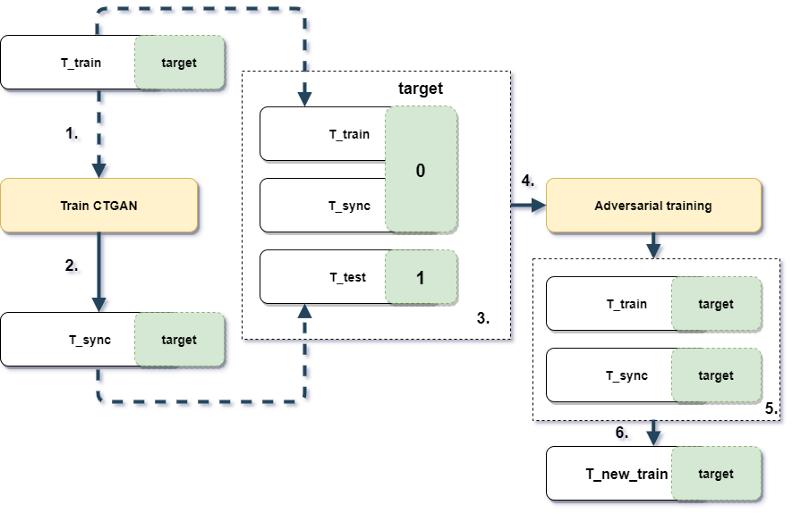
    Experiment design and workflow

    Picture 1.1 Experiment design and workflow

    Results

    The table below (Table 1.2) shows ROC AUC scores for different sampling strategies. To facilitate comparison across datasets with potentially different baseline AUC scores, the ROC AUC scores for each dataset were scaled using min-max normalization (where the maximum score achieved by any method on that dataset becomes 1, and the minimum becomes 0). These scaled scores were then averaged across all datasets for each sampling strategy. Therefore, a higher value in the table indicates better relative performance in generating data that is difficult for a classifier to distinguish from the original data, when compared to other methods on the same set of datasets.

    Table 1.2 Averaged Min-Max Scaled ROC AUC scores for different sampling strategies across datasets. Higher is better (closer to 1 indicates performance similar to the best method on each dataset).

    dataset_name None gan sample_original
    credit 0.997 0.998 0.997
    employee 0.986 0.966 0.972
    mortgages 0.984 0.964 0.988
    poverty_A 0.937 0.950 0.933
    taxi 0.966 0.938 0.987
    adult 0.995 0.967 0.998

    Citation

    If you use tabgan in a scientific publication, we would appreciate references to the following BibTex entry: arxiv publication:

    @misc{ashrapov2020tabular,
          title={Tabular GANs for uneven distribution}, 
          author={Insaf Ashrapov},
          year={2020},
          eprint={2010.00638},
          archivePrefix={arXiv},
          primaryClass={cs.LG}
    }

    References

    [1] Xu, L., & Veeramachaneni, K. (2018). Synthesizing Tabular Data using Generative Adversarial Networks. arXiv:1811.11264 [cs.LG].

    [2] Jolicoeur-Martineau, A., Fatras, K., & Kachman, T. (2023). Generating and Imputing Tabular Data via Diffusion and Flow-based Gradient-Boosted Trees. Retrieved from https://github.com/SamsungSAILMontreal/ForestDiffusion.

    [3] Xu, L., Skoularidou, M., Cuesta-Infante, A., & Veeramachaneni, K. (2019). Modeling Tabular data using Conditional GAN. NeurIPS.

    [4] Borisov, V., Sessler, K., Leemann, T., Pawelczyk, M., & Kasneci, G. (2023). Language Models are Realistic Tabular Data Generators. ICLR.

    Visit original content creator repository
  • termin-bot

    UPDATE:

    NO LONGER WORKS DUE TO BOT DETECTION. COULD BE USED AS A TEMPLATE FOR OTHER RESOURCES.

    Termin-Bot

    Idea

    Termin (eng. appointment) is essential in Germany, especially in Berlin.
    Sometimes it is tough to get a termin in public institutions and
    this bot is a way to automate termin check and
    send Telegram notification, if free
    termin was found.
    The code could be also considered as a template for subsequent development.

    Getting Started

    The principle of bot operation is to refresh a webpage with needed appointments periodically
    [TERMIN_URL] and to recognize the change on it. E.g., the page always contains
    the phrase “No free appointments” [NO_TERMIN_FOUND_STRING].
    Then some free appointments are added to the system,
    and the phrase “No free appointments” disappears. There is a new phrase
    (e.g., “List of free appointments” [TERMIN_FOUND_STRING]) instead of the old one.
    Bot recognizes the change on the webpage and sends Telegram notifications about free appointments.

    To first use the program, you must create a properties file for termin-bot.

    There is an example: src/main/resources/global.properties.

    Here is a list of the properties:

    BOT_NAME – The name of the bot. Used only in the log output.

    BOT_PORT – The port which the chrome driver uses to check termin webpage.

    BOT_TOKEN – Unique telegram bot token. You can get it after the creation of the telegram bot.
    Use BotFather to create a bot. If you want to start the program without
    telegram notifications, please start with the default value from the example properties file.

    USERS – List of usernames from Telegram who get access to the bot. It could be ignored,
    if you test the program without Telegram notifications.

    CHAT_IDS – Telegram chat id, which is generated after the user sends the first message to the bot. Leave this field empty. It will be filled in automatically.

    TERMIN_URL – The link to a website with appointments. This termin-bot was tested with the following website:
    https://otv.verwalt-berlin.de/ams/TerminBuchen
    If you use it for the same resource, paste the link with the needed Visa type.

    TERMIN_FOUND_STRING – The webpage’s phrase complies with free appointments.
    An example is provided for otv.verwalt-berlin.de.

    NO_TERMIN_FOUND_STRING – The webpage’s phrase complies with the absence of free appointments.
    An example is provided for otv.verwalt-berlin.de

    BUTTON_ID – The button which should be clicked to get a page with appointments.
    An example is provided for otv.verwalt-berlin.de

    How to use

    Startup

    After editing the properties file you can build this java program with Maven or use
    released version.

    You need Java 11 to run it.

    To start the bot, run jar file with a path to the properties file as an argument.

    java -jar termin-bot-1.0-jar-with-dependencies.jar <path_to_properties_file>
    

    If you start the program without an argument, the default path to properties is src/main/resources/global.properties.

    Run with Docker

    You could also run the bot in Docker container.
    Go to the root folder of the project and run the following commands:

    docker build -t my-termin-bot -f src/main/docker/Dockerfile .
    docker run --name termin-bot-container my-termin-bot
    

    Important:

    • Before the building of docker image be sure that the jar-with-dependencies is present after maven build in
      target folder. If you have problems with the build, create target folder in the project root directory and paste the released
      version of jar file.

    • By default, for docker image is used the properties from src/main/resources/global.properties. If you want to change
      it, edit src/main/docker/Dockerfile

    • Hardcode CHAT_IDS in properties file or use Docker volumes.
      After container restart all editions of properties file will be deleted.

    Deploy on Heroku

    If you want to host this bot, you can use Heroku.
    It is easy to host Docker containers there. You need only heroku.yml.

    Find it here: src/main/docker/heroku.yml

    Information on how to deploy docker containers on Heroku:
    https://devcenter.heroku.com/articles/build-docker-images-heroku-yml

    Visit original content creator repository

  • ymate-module-fileuploader

    YMATE-MODULE-FILEUPLOADER

    Maven Central status LICENSE

    基于 YMP 框架实现的文件上传及资源访问服务模块,特性如下:

    • 支持文件指纹匹配,秒传;
    • 支持图片文件多种规则等比例压缩;
    • 支持视频文件截图;
    • 支持上传文件 ContentType 白名单过滤;
    • 支持主从负载模式配置;
    • 支持自定义响应报文内容;
    • 支持自定义扩展文件存储策略;
    • 支持跨域上传文件及用户身份验证;
    • 支持 MongoDB 文件存储;

    Maven包依赖

    <dependency>
        <groupId>net.ymate.module</groupId>
        <artifactId>ymate-module-fileuploader</artifactId>
        <version>2.0.0</version>
    </dependency>

    模块配置参数说明

    #————————————- # module.fileuploader 模块初始化参数 #————————————- # 节点标识符, 默认值: unknown ymp.configs.module.fileuploader.node_id= # 缓存名称前缀, 默认值: “” ymp.configs.module.fileuploader.cache_name_prefix= # 缓存数据超时时间, 可选参数, 数值必须大于等于0, 否则将采用默认 ymp.configs.module.fileuploader.cache_timeout= # 默认控制器服务请求映射前缀(不允许”https://github.com/”开始和结束), 默认值: “” ymp.configs.module.fileuploader.service_prefix= # 是否注册默认控制器, 默认值: true ymp.configs.module.fileuploader.service_enabled= # 是否开启代理模式, 默认值: false ymp.configs.module.fileuploader.proxy_mode= # 代理服务基准URL路径(若开启代理模式则此项必填), 必须以 http:// 或 https:// 开始并以”https://github.com/”结束, 如: http://www.ymate.net/fileupload/, 默认值: 空 ymp.configs.module.fileuploader.proxy_service_base_url= # 代理客户端与服务端之间通讯请求参数签名密钥, 默认值: “” ymp.configs.module.fileuploader.proxy_service_auth_key= # 上传文件存储根路径(根据存储适配器接口实现决定其值具体含义), 默认存储适配器取值: ${root}/upload_files ymp.configs.module.fileuploader.file_storage_path= # 缩略图文件存储根路径(根据存储适配器接口实现决定其值具体含义), 默认存储适配器取值与上传文件存储根路径值相同 ymp.configs.module.fileuploader.thumb_storage_path= # 静态资源引用基准URL路径, 必须以 http:// 或 https:// 开始并以”https://github.com/”结束, 如: http://www.ymate.net/static/resources/, 默认值: 空(即不使用静态资源引用路径) ymp.configs.module.fileuploader.resources_base_url= # 文件存储适配器接口实现, 若未提供则使用系统默认, 此类需实现net.ymate.module.fileuploader.IFileStorageAdapter接口 ymp.configs.module.fileuploader.file_storage_adapter_class= # 图片文件处理器接口实现, 若未提供则使用系统默认, 此类需实现net.ymate.module.fileuploader.IImageProcessor接口 ymp.configs.module.fileuploader.image_processor_class= # 资源处理器类, 用于资源上传、匹配及验证被访问资源是否允许(非代理模式则此项必填), 此类需实现net.ymate.module.fileuploader.IResourcesProcessor接口 ymp.configs.module.fileuploader.resources_processor_class= # 文件上传成功后是否自动执行生成图片或视频截图缩略图, 默认值: false ymp.configs.module.fileuploader.thumb_create_on_uploaded= # 是否允许自定义缩略图尺寸, 默认值: false ymp.configs.module.fileuploader.allow_custom_thumb_size= # 缩略图尺寸列表, 该尺寸列表在允许自定义缩略图尺寸时生效, 若列表不为空则自定义尺寸不能超过此范围, 如: 600_480|1024_0 (0表示等比缩放, 不支持0_0), 默认值: 空 ymp.configs.module.fileuploader.thumb_size_list= # 缩略图清晰度, 如: 0.70f, 默认值: 0f ymp.configs.module.fileuploader.thumb_quality= # 允许上传的文件ContentType列表, 如: image/png|image/jpeg, 默认值: 空, 表示不限制 ymp.configs.module.fileuploader.allow_content_types=

    示例代码:

    **示例一:**上传文件,以 POST 方式请求 URL 地址:

    http://localhost:8080/uploads/push

    参数说明:

    • file: 上传文件流数据;
    • type: 指定请求结果处理器,若未提供则采用默认,可选值: fileupload

    响应:

    • 未指定 type 参数时:
    {
        "ret": 0,
        "data": {
            "createTime": 1638200758000,
            "extension": "mp4",
            "filename": "a1175d94f245b9a142955b42ac285dc2.mp4",
            "hash": "a1175d94f245b9a142955b42ac285dc2",
            "lastModifyTime": 1638200758000,
            "mimeType": "video/mp4",
            "size": 21672966,
            "sourcePath": "video/a1/17/a1175d94f245b9a142955b42ac285dc2.mp4",
            "status": 0,
            "type": "VIDEO",
            "url": "http://localhost:8080/uploads/resources/video/a1175d94f245b9a142955b42ac285dc2"
        }
    }
    • 指定 type=fileupload 时:
    {
        "files": [
            {
                "size": 21672966,
                "name": "a1175d94f245b9a142955b42ac285dc2.mp4",
                "type": "video",
                "hash": "a1175d94f245b9a142955b42ac285dc2",
                "thumbnailUrl": "http://localhost:8080/uploads/resources/video/a1175d94f245b9a142955b42ac285dc2"
            }
        ]
    }

    **示例二:**文件指纹匹配,以 POST 方式请求 URL 地址:

    http://localhost:8080/uploads/match

    参数说明:

    • hash: 文件哈希值(MD5),必选参数;

    响应:

    若匹配成功则返回该文件的描述信息;

    {
        "ret": 0,
        "matched": true,
        "data": {
            "createTime": 1638200758000,
            "extension": "mp4",
            "filename": "a1175d94f245b9a142955b42ac285dc2.mp4",
            "hash": "a1175d94f245b9a142955b42ac285dc2",
            "lastModifyTime": 1638200758000,
            "mimeType": "video/mp4",
            "size": 21672966,
            "sourcePath": "video/a1/17/a1175d94f245b9a142955b42ac285dc2.mp4",
            "status": 0,
            "type": "VIDEO",
            "url": "http://localhost:8080/uploads/resources/video/a1175d94f245b9a142955b42ac285dc2"
        }
    }

    **示例三:**文件资源访问,以 GET 方式请求 URL 地址:

    http://localhost:8080/uploads/resources/{type}/{hash}

    参数说明:

    • type: 文件类型,必选参数,可选值范围:imagevideoaudiotextapplicationthumb

    • hash: 文件哈希值(MD5),必选参数;

    :若需要强制浏览器下载资源,只需在请求参数中添加?attach即可,并支持通过?attach=<FILE_NAME>方式自定义文件名称(文件名称必须合法有效,不能包含特殊字符,否则将使用默认文件名称)。

    One More Thing

    YMP 不仅提供便捷的 Web 及其它 Java 项目的快速开发体验,也将不断提供更多丰富的项目实践经验。

    感兴趣的小伙伴儿们可以加入官方 QQ 群:480374360,一起交流学习,帮助 YMP 成长!

    如果喜欢 YMP,希望得到你的支持和鼓励!

    Donation Code

    了解更多有关 YMP 框架的内容,请访问官网:https://ymate.net

    Visit original content creator repository